
There are two steps required if one wants to display a Webchat Plugin in the Webchat window:
- Install the Webchat Plugin
- Tell the Webchat to display it
For installing the plugin, please follow this guide. Finally, one can use a Say Node in order to tell the Webchat that it should display a specific Webchat Plugin with a related configuration. Therefore, a so-called DATA-ONLY Message is used, which will look similar to the following (Example: Rating Webchat Plugin):
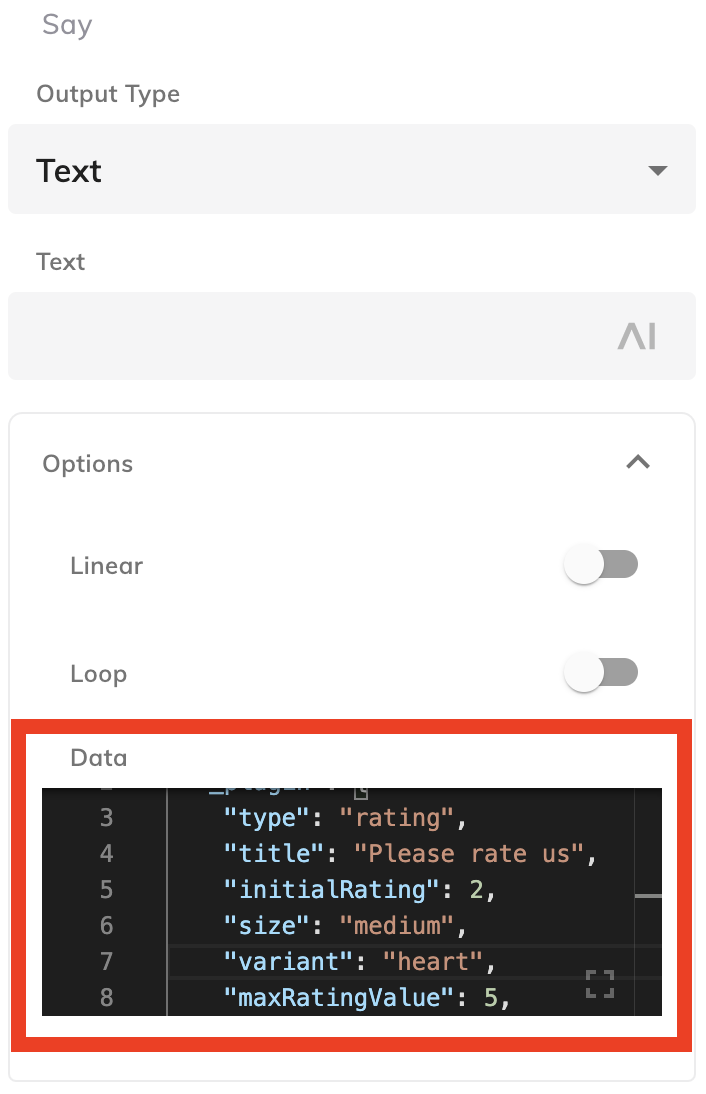
One will find the data information, JSON format, on the GitHub page of the related Webchat Plugin:
{
  "_plugin": {
    "type": "rating",
    "title": "Please rate us",
    "initialRating": 2,
    "size": "medium",
    "variant": "heart",
    "maxRatingValue": 5,
    "precision": 1,
    "rateButtonText": "Send Rating"
  }
}
Please note that the JSON shown above changes from Plugin to Plugin.
Inside the Flow, one will see a simple Say node:
In order to improve the maintenance, one should use the node's style function and rename the label:
Result
As soon as the Say node is executed, the Webchat will display the following (Example: Rating Webchat Plugin):

Comments
0 comments